Tutorial 1: Creating an Application#
This first tutorial will guide you through the process of setting up a new application using the DiFfRG. This first program will simply solve a hydrodynamic equation unrelated to fRG, but introduce the basic structure of a typical DiFfRG application.
You can find the full code as described here also in Tutorials/tut1.
File structure#
We start by creating a new directory for the application. It can live anywhere: the application finds the installed library through CMake, not through its location in the source tree.
$ mkdir tut1
$ cd tut1
$ touch CMakeLists.txt
$ touch tut1.cc
$ touch model.hh
$ touch parameter.json
The
CMakeLists.txtfile is used to tell CMake how to build the project.The
tut1.ccfile contains the main function of the simulation and the most general structure of the simulation.In the
model.hhfile we will define the numerical model, i.e. the set of differential equations that we want to solve.The
parameter.jsonfile will contain the parameters for the simulation.
CMake setup#
The CMakeLists.txt file is the first thing we need to set up. CMake is a powerful build system which automates complex setup of dependencies and structure of C++ programs. For a deeper understanding, please consult the documentation and see the DiFfRG build system setup in DiFfRG/cmake/setup_build_system.cmake.
In our case, we need to tell CMake about our new simulation and about the DiFfRG library. In practice, our CMakeLists.txt file looks as in the following:
cmake_minimum_required(VERSION 3.27.0)

project(tut1)
In the above, we first request a minimum version of CMake and then declare our project.
find_package(DiFfRG REQUIRED HINTS $ENV{HOME}/.local/share/DiFfRG/)
Afterwards, we request CMake to find the DiFfRG package. We point it at the default install path here, which is $HOME/.local/share/DiFfRG/, but depending on where you installed DiFfRG, you will have to change this.
add_executable(tut1 tut1.cc)
target_link_libraries(tut1 PRIVATE DiFfRG::DiFfRG)
Finally, we register an executable with CMake (called tut1) and link it against the imported DiFfRG::DiFfRG target. This is a CMake interface target: linking against it transitively pulls in all include paths, compiler flags and dependencies a DiFfRG-application needs (deal.II, Kokkos, Boost, SUNDIALS, …). The underlying setup logic lives in DiFfRG/cmake/setup_build_system.cmake and is applied automatically when the package is found.
Optionally, we also create a symlink to our parameter file in the build directory so that the executable finds it when run from there:
execute_process(
  COMMAND
    ${CMAKE_COMMAND} "-E" "create_symlink"
    "${CMAKE_CURRENT_SOURCE_DIR}/parameter.json"
    "${CMAKE_CURRENT_BINARY_DIR}/parameter.json")
With this set up, we can immediately create our build directory and test the build system. To that end, create a new directory and enter it,
$ mkdir build
$ cd build
Then, invoke cmake,
$ cmake -DCMAKE_BUILD_TYPE=Release ..
Here, we tell CMake to create an optimized “Release” build. The last argument to the cmake command, .., tells it where the source files can be found. In this case, it finds the CMakeLists.txt we just created in the parent directory and uses it to set up the build system. DiFfRG already compiles its applications with a set of sensible optimization flags, so no further CMAKE_CXX_FLAGS are required.
At this point you could already invoke the build system by running
$ make -j8
which will build the whole project using 8 cores. However, doing this will at this stage only lead to a linker error, as the tut1.cc file does not contain anything yet. In particular, the program lacks an entry point, i.e. a main function.
tut1.cc#
Now we are ready to set up the main structure of the program in tut1.cc.
#include <DiFfRG/DiFfRG.hh>

#include "model.hh"

using namespace DiFfRG;

int main(int argc, char *argv[])
{
The first include, DiFfRG/DiFfRG.hh, is the umbrella header of the library: it pulls in the discretizations, assemblers, timesteppers and common utilities we will use in a moment. Next, we include the model.hh file, where we will set up the actual system of equations to solve.
All relevant classes and functions are in the DiFfRG master namespace, so for convenience we just import all symbols from this namespace into our code by using namespace DiFfRG;.
The actual program logic starts with the entry point, the main function. The very first thing to do is to initialize DiFfRG and read the parameter file parameter.json we created earlier:
  // Initialize DiFfRG and thus the MPI and Kokkos environments
  const auto config_helper = DiFfRG::Init(argc, argv).get_configuration_helper();
  // get all needed parameters and parse from the CLI
  const auto json = config_helper.get_config();
DiFfRG::Init(argc, argv) sets up the runtime environment - in particular it initializes Kokkos (which provides the CPU/GPU parallelization) and, if enabled, MPI. It must be called once at the start of main before any DiFfRG object is constructed. The environments then stay up until the program exits; they are shut down at exit, not when the Init object goes out of scope, so a temporary Init as above is fine. From it we obtain a ConfigurationHelper.
The ConfigurationHelper class automatically chooses the correct parameter file; if the executable is invoked with the -p parameter, i.e. ./tut1 -p parameter.json, the argument of -p is chosen as the parameter file. Otherwise, ConfigurationHelper will try to open a file called parameter.json in the current working directory, falling back to parameter.toml if that does not exist. The parameters can be specified either in the JSON or in the TOML format; files ending in .toml are read as TOML, everything else as JSON. This tutorial ships both parameter.json and the equivalent, commented parameter.toml.
The argc, argv parameters are forwarded so that command line flags and arguments can be parsed.
Afterwards, we load the entire parameter structure into the json variable, a ConfigTree which has the same structure as the original parameter file.
After setting up the configuration, we choose the algorithms used in our simulation. To do so, we make some convenient type aliases with the chosen class types:
  // Choices for types
  using Model = Tut1;
  constexpr uint dim = Model::dim;
  using Discretization = CG::Discretization<Model, RectangularMesh<dim>>;
  using Assembler = CG::Assembler<Discretization>;
  using TimeStepper = TimeStepperSUNDIALS_IDA<Assembler>;
After making an alias for the numerical model, which we will specify in a moment, we take the field-space dimension from it.
The Discretization gives a prescription to discretize the field space on a mesh, here a RectangularMesh. We choose the CG, i.e. Continuous Galerkin discretization and accordingly a fitting Assembler; both are told which model they discretize through their template arguments. The assembler, as the name implies, assembles the system of equations to be solved. In practice, the differential equation you specify in the Model is discretized by the Assembler using the Discretization and brought into the form of a time-dependent, nonlinear ODE (ordinary differential equation)
where \(v_i\) are the components of the discretization. The Assembler is directly invoked by the TimeStepper which requests the construction of the above equation at every (RG) time step and evolves the system according to it.
If you are unfamiliar with FEM methods, it would be recommended to at least understand the basics of it.
Next, we choose the SUNDIALS_IDA timestepper, which is the most performant choice for FEM setups with spontaneous symmetry breaking. IDA is a differential-algebraic solver, i.e. it solves both equations dependent on time, as above,
but also stationary (secondary) equations without explicit dependence on time derivatives,
We will show the utility of this in a later tutorial.
The timestepper also takes an optional second template argument, the linear solver for its Newton steps. It defaults to the direct solver UMFPack, which solves any linear system exactly and is a good choice in one field dimension. For large systems, e.g. in \(d\geq2\), an iterative solver such as GMRES (TimeStepperSUNDIALS_IDA<Assembler, GMRES>) is usually much faster; see Timesteppers and linear solvers.
  // Define the objects needed to run the simulation
  Model model(json);
  RectangularMesh<dim> mesh{Config::ConfigurationMesh<dim>(json)};
  OutputSession<Assembler> data_out(json);
  const auto log = data_out.report_port();
  Discretization discretization(mesh, json, log);
  Assembler assembler(discretization, model, json);
  TimeStepper time_stepper(json, assembler, data_out);
We now construct an object of each of the types above. Two of them deserve a word:
The mesh reads its extent and cell sizes from the
/discretization/gridsection of the parameter file, throughConfig::ConfigurationMesh.The
OutputSessionowns everything the run writes to disk (see Output).logis a handle to its run log, which every component uses for messages; we use it ourselves at the end ofmain.
With everything prepared, we are now ready to set up and run the equation system. To do so, we create an initial condition on the discretization (i.e. FEM space) we set up before,
  // Set up the initial condition
  FE::FlowingVariables initial_condition(discretization);
  initial_condition.interpolate(model);
and use it to run the time-stepper from RG-time 0 to the final RG-time, which we infer from the parameter file:
  // Now we start the timestepping
  Timer timer;
  try {
    time_stepper.run(initial_condition, 0., json.get_double("/timestepping/final_time"));
  } catch (std::exception &e) {
    log.error("Simulation finished with exception {}", e.what());
    return -1;
  }
Note here, that RG-time is defined on the level of the code as positive, i.e.
whereas the usual convention is
Furthermore, we recorded the time the simulation took using the dealii::Timer class.
We finish the program by reporting the elapsed time. The timestepper itself already writes a short performance summary of the assembler to the log at the end of the run.
  // We print a bit of exit information.
  auto time = timer.wall_time();
  log.info("Simulation finished after " + time_format(time));
  return 0;
}
model.hh#
Now we need to specify the equation system to solve. For this example, we will just implement Burgers’ equation, which is not fRG-related but a simple hydrodynamic equation given by
First things first, we set a few things up before we get to the equation system:
#pragma once

#include <DiFfRG/model/model.hh>

using namespace DiFfRG;

struct Parameters {
  Parameters(const ConfigTree &value)
  {
    try {
      a = value.get_double("/physical/a");
      b = value.get_double("/physical/b");
      c = value.get_double("/physical/c");
      d = value.get_double("/physical/d");
    } catch (std::exception &e) {
      std::cout << "Error in reading parameters: " << e.what() << std::endl;
    }
  }
  double a, b, c, d;
};
Although not necessary in this case, the #pragma once compiler directive ensures that the header file is not included multiple times (similar to the use of include guards), which would lead to compiler errors.
The DiFfRG/model/model.hh header contains basic predefines necessary for the setup of a numerical model. Again, we import all symbols from the DiFfRG namespace.
Afterwards, we create a struct to hold parameters we read once from the JSON variable. We call these a,b,c,d and will use them to construct the initial condition for the differential equation, i.e. \(u(x,0)\).
With this in place, let’s set the equation system structure up:
using FEFunctionDesc = FEFunctionDescriptor<Scalar<"u">>;
using Components = ComponentDescriptor<FEFunctionDesc>;
constexpr auto idxf = FEFunctionDesc{};
Our system is very small, consisting only of a single equation. With large fRG simulations this can grow however extremely large, using momentum grids of variables and large vertex expansions. Thus, DiFfRG provides a mechanism of describing these systems and smartly indexing the numerical degrees of freedom. Here, we use a descriptor to tell the library how many and what kinds of functions we have. We use one function which lives on a FEM discretization and thus use the FEFunctionDescriptor with one Scalar which we call “u” as in the above equation.
If we had two variables, e.g. another one called \(v\), we would declare this as
FEFunctionDescriptor<Scalar<"u">, Scalar<"v">>;. We will treat the declaration of larger systems in a later tutorial in-detail.
The ComponentDescriptor type packs the FEFunctionDescriptor together with other parts of the equation system; here, we only have a FE function and thus do not provide more template parameters.
Creating a compile-time constant (constexpr) object of the descriptor is useful for easier access to the indices, which we will use below.
/**
 * @brief This class implements the numerical model for Burgers' equation.
 */
class Tut1 : public def::AbstractModel<Tut1, Components>,
             public def::fRG,                  // this handles the fRG time
             public def::FlowBoundaries<Tut1>, // use Inflow/Outflow boundaries
             public def::AD<Tut1>              // define all jacobians per AD
{
Now we define the actual numerical model. We need to derive the class from def::AbstractModel, which defines all necessary methods so our numerical model can be used by the Assembler. Here, we also communicate the structure of our equation system through the Components type we declared earlier. Furthermore, we derive from a few more classes:
def::fRGprovides a method where \(t\) is automatically communicated to the model and the RG-scale \(k\) is computed from it. Furthermore, it defines the variablestandkwhich can be directly used in the code.def::FlowBoundariesis necessary to close the FEM system, as the boundary conditions at \(x=0\) and \(x = x_\textrm{max}\) need to be specified.def::FlowBoundariessets up inflow/outflow boundary conditions.def::ADcreates methods for the automatic evaluation of jacobians of our system, i.e.
This is achieved by the use of automatic differentiation, using the autodiff library. This is also the reason why we must template and not use explicit types in the methods of the numerical model, as will be seen below.
private:
  const Parameters prm;

public:
  static constexpr uint dim = 1;

  Tut1(const ConfigTree &json) : def::fRG(json.get_double("/physical/Lambda")), prm(json) {}
Here, we have only written the constructor, communicated \(\Lambda\) to the def::fRG base class and created a Parameters object.
  template <typename Vector> void initial_condition(const Point<dim> &pos, Vector &values) const
  {
    const auto x = pos[0];
    values[idxf("u")] = prm.a + prm.b * powr<1>(x) + prm.c * powr<2>(x) + prm.d * powr<3>(x);
  }
The initial_condition method is invoked by the initial_condition.interpolate(model) call from above. We use the parameters a,b,c,d to set up a polynomial initial condition. Here, we also use the indexing provided by the FEFunctionDescriptor class, to retrieve the position of “u” within the array of FE functions. In this case, it is of course trivial, as idxf("u") always evaluates to 0. Note however, that the lookup is done statically at compile time and is thus much faster than dynamic lookup, such as with a std::map.
  template <typename NT, typename Solution>
  void flux(std::array<Tensor<1, dim, NT>, Components::count_fe_functions(0)> &flux, const Point<dim> & /*pos*/,
            const Solution &sol) const
  {
    const auto &fe_functions = get<"fe_functions">(sol);

    const auto u = fe_functions[idxf("u")];

    flux[idxf("u")][0] = 0.5 * powr<2>(u);
  }
};
The flux method implements the actual equation. sol bundles the solution at the evaluation point; its entries are addressed by name, here "fe_functions", the values of all FE functions. If we don’t specify anything else, the Assembler will construct the equation
so that our choice of \(F_i(u) = \frac12 u^2\) exactly implements Burgers’ equation.
parameter.json#
The parameter file holds the user-defined quantities in a physical section, plus the settings of the library’s components. It can be written as JSON or, as in the equivalent parameter.toml shipped alongside it, as TOML. This section walks through the file of this tutorial; every key the library reads, with its default, is listed in the parameter reference.
{
  "physical": {
    "Lambda": 1.0,
    "a": 0.0,
    "b": 1.0,
    "c": 0.0,
    "d": 0.0
  },
These are the parameters our model reads: the initial scale \(\Lambda\) for def::fRG and the coefficients of the initial condition.
  "discretization": {
    "fe_order": 3,
    "threads": 0,
    "overintegration": 0,
    "output_subdivisions": 2,

    "EoM_abs_tol": 1e-10,
    "EoM_max_iter": 200,

    "grid": {
      "x_grid": "0:1e-2:1",
      "y_grid": "0:0.1:1",
      "z_grid": "0:0.1:1",
      "refine": 0
    },
The discretization section configures the FEM setup of our simulation:
fe_ordersets the polynomial order of the local function space on each cell.threadslimits the number of CPU threads;0lets DiFfRG decide from the CPUs available to the process. Environment variables and batch schedulers can override it, see Running with MPI and several GPUs.overintegrationincreases the order of the quadrature used to assemble the weak form of the PDE. It is seldom necessary to go beyond 0.output_subdivisionssets how many sub-cells each cell is split into when the FE solution is written out. The number of output points grows exponentially with it in higher dimensions, so keep it small.EoM_abs_tolandEoM_max_itercontrol the search for the equation of motion (the minimum of the potential), at which readouts and extractors are evaluated. This tutorial does not use it.x_griddefines the cells of theRectangularMeshalong the first axis, in a slice syntaxstart:step:stop. Several blocks with different cell sizes can be joined:"0:1e-4:1e-2, 1e-2:1e-3:1"creates 100 cells between 0 and 1e-2 and 990 cells between 1e-2 and 1.y_gridandz_gridwork identically, but are only used in 2D / 3D simulations.refinesplits every cellrefinetimes, i.e. multiplies the cell count by \(2^{d\cdot\textrm{refine}}\).
    "adaptivity": {
      "start_adapt_at": 0E0,
      "adapt_dt": 2E-1,
      "level": 0,
      "tolerance": 3E-4
    }
  },
The adaptivity section controls adaptive refinement of the mesh during the flow: every adapt_dt in RG time, cells whose estimated relative resolution error exceeds tolerance are refined, up to level refinements; level = 0 switches it off. It only takes effect if main hands the timestepper a mesh adaptor; Tutorial 7 does and explains it.
  "timestepping": {
    "final_time": 10.0,
    "output_dt": 1E-1,
    "explicit": {
      "dt": 1E-4,
      "minimal_dt": 1E-6,
      "maximal_dt": 1E-1,
      "abs_tol": 1E-12,
      "rel_tol": 1E-4
    },
    "implicit": {
      "dt": 1E-4,
      "minimal_dt": 1E-6,
      "maximal_dt": 1E-1,
      "abs_tol": 1E-13,
      "rel_tol": 1E-7
    }
  },
The timestepping section controls the timestepper:
final_timeis the RG time at which the simulation ends. The library does not read it itself; we pass it totime_stepper.run(...)inmain.output_dtsets the interval at which the solution is written to disk. The timesteppers do not step exactly onto these times, but interpolate the solution to them.The
explicitandimplicitsections configure explicit and implicit timesteppers respectively. Both exist because some timesteppers evolve one part of the system implicitly (usually the FE functions) and another explicitly (e.g. momentum-dependent couplings).dtis the initial timestep for adaptive timesteppers and the fixed timestep for non-adaptive ones.minimal_dtandmaximal_dtbound the step size of adaptive steppers. If a stepper gets stuck belowminimal_dt, the run is aborted.abs_tolandrel_tolset the absolute and relative error tolerances. The FE part usually needs a tight relative tolerance (below 1e-7), especially with spontaneous symmetry breaking; the explicit part can be much looser.
For more on timesteppers and spontaneous symmetry breaking in fRG flows, see this paper.
  "output": {
    "verbosity": 1,
    "folder": "./",
    "name": "output"
  }
}
The output section defines:
verbosity: how much progress is printed to the console, from 0 (only warnings and errors) to 3 (detailed solver diagnostics). The levels are described in Output.folder: the directory all output goes to.name: the prefix of all output files, i.e. here all files created by the simulation start with “output”.
Running it#
To run the simulation, first build it,
$ make
and then directly run it through
$ ./tut1 -p ../parameter.json -si /output/verbosity=1
The flag -p selects the parameter file. Without it, the program looks for parameter.json in the current directory, falling back to parameter.toml. Any parameter can be overridden on the command line: -sd sets a double, -si an integer, -sb a boolean and -ss a string, each followed by the full path of the parameter, an equals sign and the value.
Tip
./tut1 --generate-parameter-file writes a parameter.toml with every library parameter at its default value, a good starting point for a new application.
The simulation takes about a second. Afterwards, the current folder contains
output.log, the run log: progress, messages and a final performance summary.[run] [info] FEM: Number of active cells: 100 [run] [info] FEM: Number of degrees of freedom: 301 [run] [info] IDA: steps=1612 residuals=3234 setups=17 newton_iters=3232 newton_fails=1 error_test_fails=1 [run] [info] [sum] CG reinit=1.11131ms(1) residual=0.07187ms(3234) jac=0.11244ms(17) jac eval=0.05650ms(17) [run] [info] Simulation finished after 0s [run] [info] [res ] t=10.00000 k=4.540e-05 wall=568ms implicit n=3234 avg=0.07604ms
(each line is additionally prefixed with a time stamp).
output.h5, the simulation data in HDF5 format, including the parameters used under its/configgroup. Its root attributesfinishedandcrashedtell how the run ended:(1, 0)ran to completion,(1, 1)stopped on an error but closed its output cleanly,(0, 0)was killed (or is still running).output.pvdand the folderoutput/, the FE solution as VTK files for ParaView.output_potential.pvdandoutput_eom_potential.pvd, a reconstruction of the potential whose derivative the FE functions describe. They are not meaningful for Burgers’ equation and can be ignored here.
The full list of files and their layout is in Output.
After invoking $ paraview output.pvd, we open a new tab and choose line chart view:
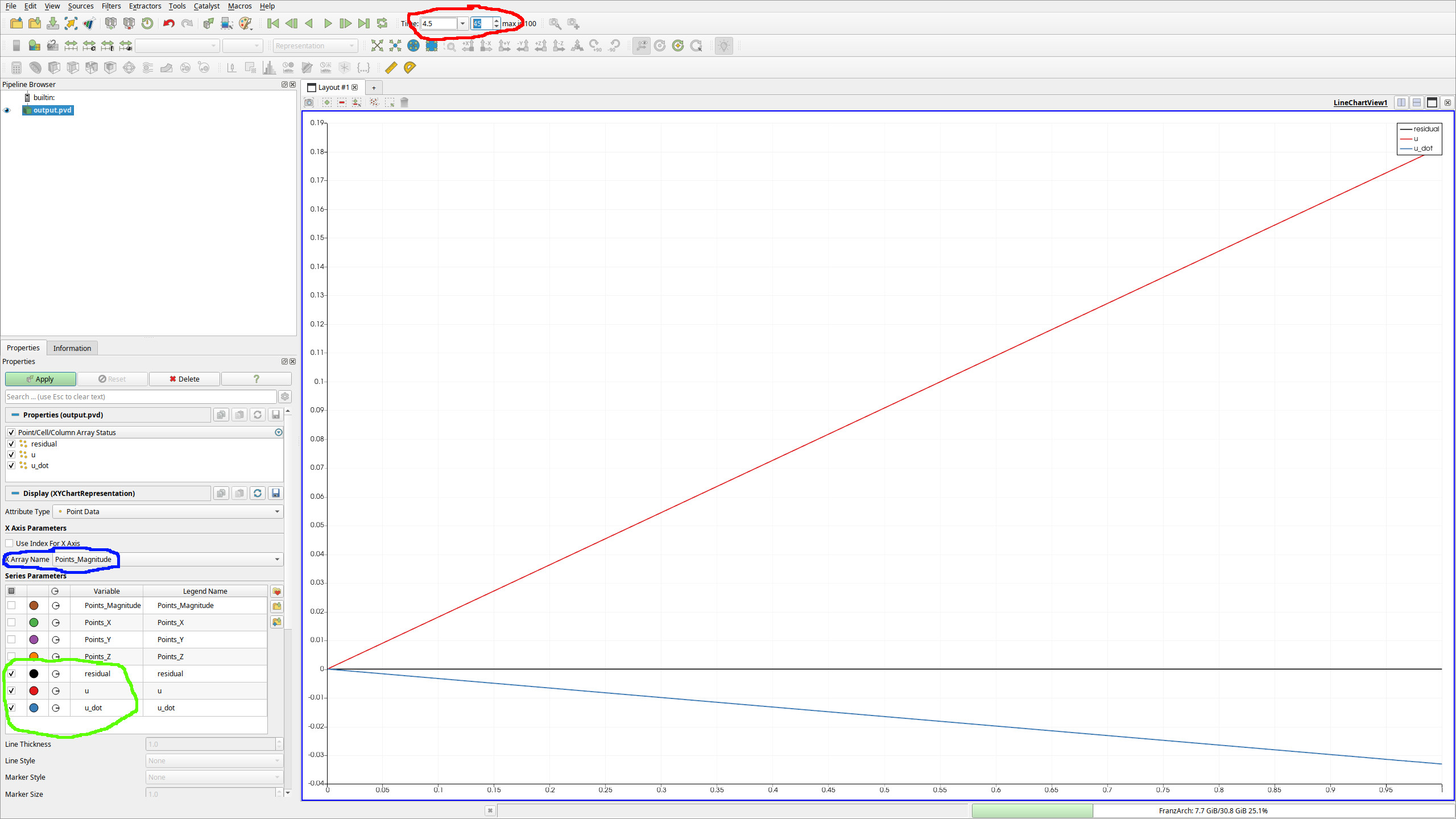
The FE solution of Burgers’ equation in ParaView’s line chart view.#
At the red marked field, one can change the currently displayed time of the FEM function.
The field marked in blue defines what the x-axis is. The default sets this to indices, but this does not work well in general and especially for irregularly spaced grids. Therefore, one would usually set this to
Points_Magnitudefor a 1D FEM simulation.In the green marked part you see that we have the FE functions
u,residualandu_dotwhich we can look at.uof course is just the solution to Burgers’ equation,u_dotis its time derivative, andresidualis the local error of the equation.
Feel free to play around also with the parameters a,b,c,d and other parts of the parameters in order to get acquainted with the basics of the framework.